> For the complete documentation index, see [llms.txt](https://docs.sea-lion.ai/llms.txt). Markdown versions of documentation pages are available by appending `.md` to page URLs; this page is available as [Markdown](https://docs.sea-lion.ai/guides/inferencing/amazon_bedrock.md).
# Amazon Bedrock Custom Model Import
The [SEA-LION models](https://huggingface.co/aisingapore) are open source and freely available for research and commercial use. A common question we receive from developers is how to host and configure SEA-LION for model inference in their own environments. When it comes to deploying our models, organizations have several hosting options available to them. One such approach involves using the [Custom Model Import](https://aws.amazon.com/bedrock/custom-model-import/) feature in [Amazon Bedrock](https://aws.amazon.com/bedrock/), which allows for integration within Amazon’s cloud infrastructure.
At the time of writing, the [supported model architectures](https://docs.aws.amazon.com/bedrock/latest/userguide/model-customization-import-model.html#model-customization-import-model-architecture) include Llama 3 and Llama 3.1. The [Llama-SEA-LION-v3-8B-IT](https://huggingface.co/aisingapore/Llama-SEA-LION-v3-8B-IT) and [Llama-SEA-LION-v3-70B-IT](https://huggingface.co/aisingapore/Llama-SEA-LION-v3-70B-IT) models are supported. The SEA-LION models not built using the Llama architecture (such as Gemma2 and MPT) are not supported.
This article outlines the process of importing the SEA-LION model into Amazon Bedrock and includes a demo application that integrates with the imported model.
## Prerequisites
If you do not already have an Amazon Web Services (AWS) account, please [sign up](https://aws.amazon.com/resources/create-account/) first.
Note that in following this guide, the following AWS services are paid services and will incur costs:
* Amazon Bedrock
* Amazon S3
Please check that the following are installed on your development machine.
* [Git](https://git-scm.com/downloads)
* [Python](https://www.python.org/downloads/)
## Amazon Bedrock
[Amazon Bedrock](https://aws.amazon.com/bedrock/) is a fully managed service that simplifies the deployment and scaling of AI models. It provides access to high-performing foundation models, enabling a serverless experience for model deployment and integration. With **Custom Model Import**, users can upload their own models and use a unified platform for AI development.
### Pricing Model of Custom Model Import
There is no charge to import a custom model to Bedrock. Once you import a model, you will be able to access it **on-demand** without requiring to perform any control plane action.
You are only **charged for model inference**, based on the number of copies of your custom model required to service your inference volume and the duration each model copy is active, **billed in 5-minute windows**.
A model copy is a single instance of an imported model ready to serve inference requests. The price per model copy per minute depends on factors such as architecture, context length, AWS Region, compute unit version (hardware generation), and is tiered by model copy size.
A monthly storage cost per Custom Model Unit is applicable. The Custom Model Units needed to host a model depend on a variety of factors — notably the model architecture, model parameter count, and context length. The exact number of Custom Model Units needed will be determined at the time of import.
Please refer to the [Amazon Bedrock Pricing](https://aws.amazon.com/bedrock/pricing/) page, including the Custom Model Import pricing under the Pricing Details section, for the latest information.
## Import the SEA-LION Model
The model used in this guide is [Llama-SEA-LION-v3-8B-IT](https://huggingface.co/aisingapore/Llama-SEA-LION-v3-8B-IT). This section describes the steps to import the model.
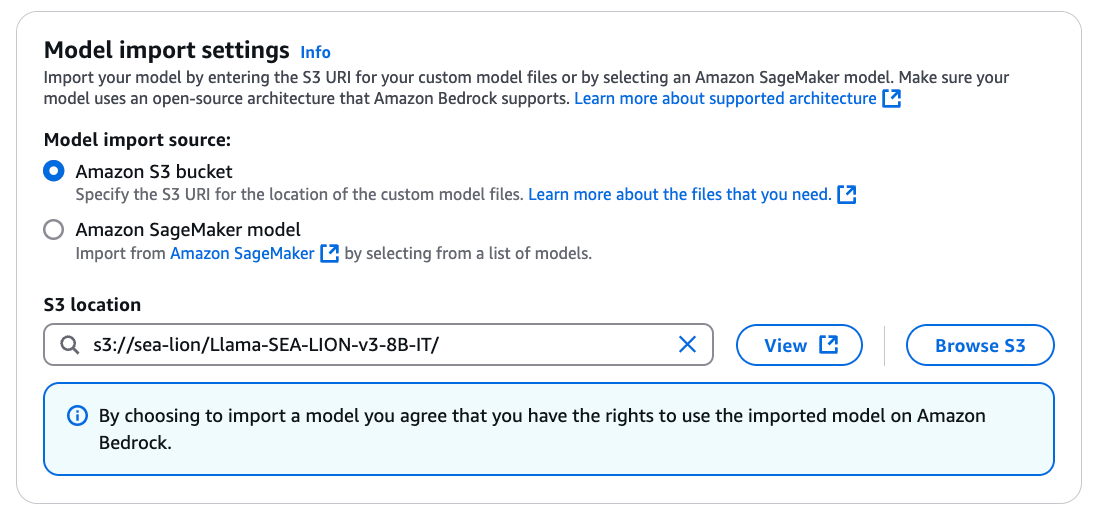
Upload the contents of to an Amazon S3 bucket. Please take note of the [Amazon S3 Pricing](https://aws.amazon.com/s3/pricing/).
As the time of writing, Amazon Bedrock Custom Model Import is supported in the us-east-1 (N. Virginia) and us-west-2 (Oregon) regions. Please check the [Amazon Bedrock documentation](https://docs.aws.amazon.com/bedrock/latest/userguide/model-customization-import-model.html) for the latest information.
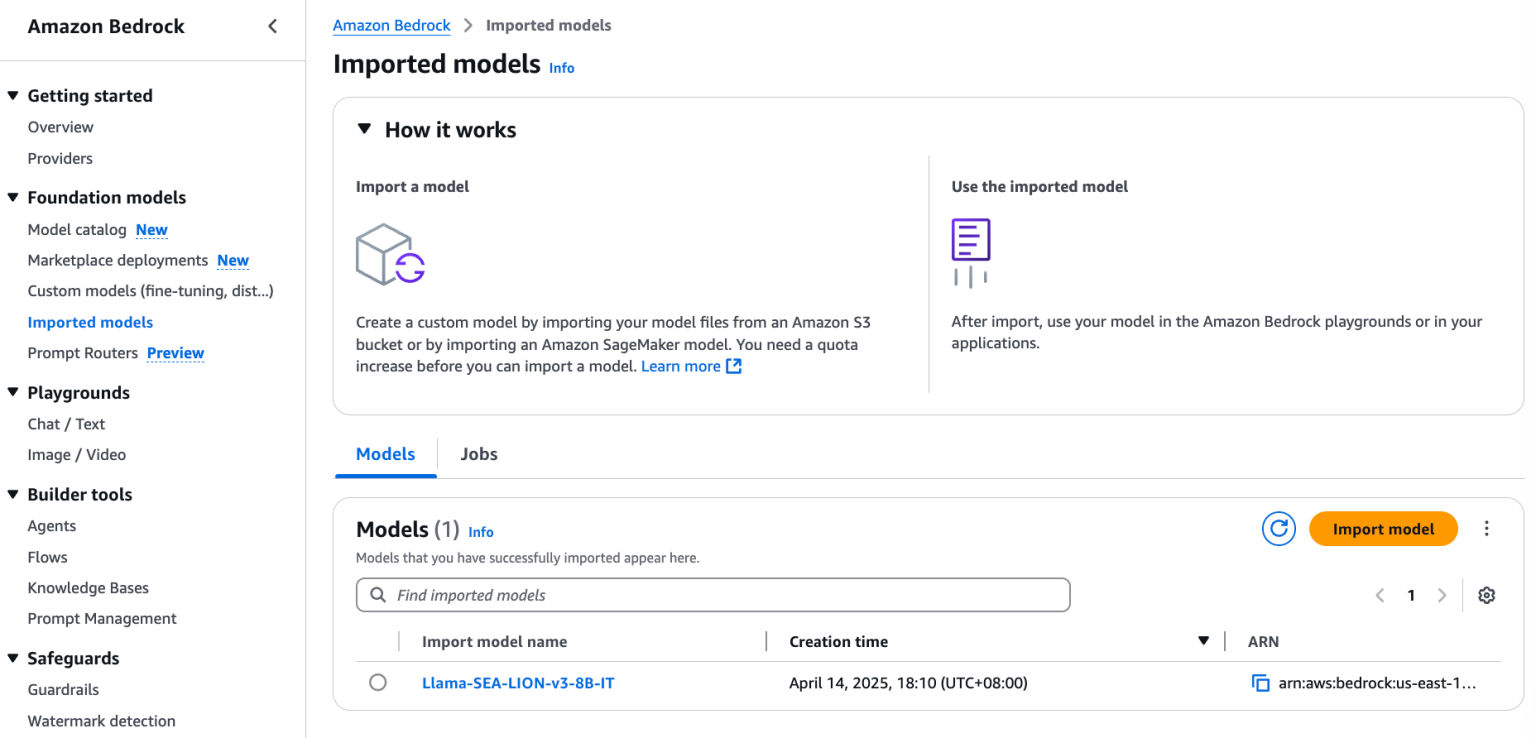
Select a supported region in the AWS Console. Navigate to Amazon Bedrock, **Imported Models**. Click the **Import Model** button.
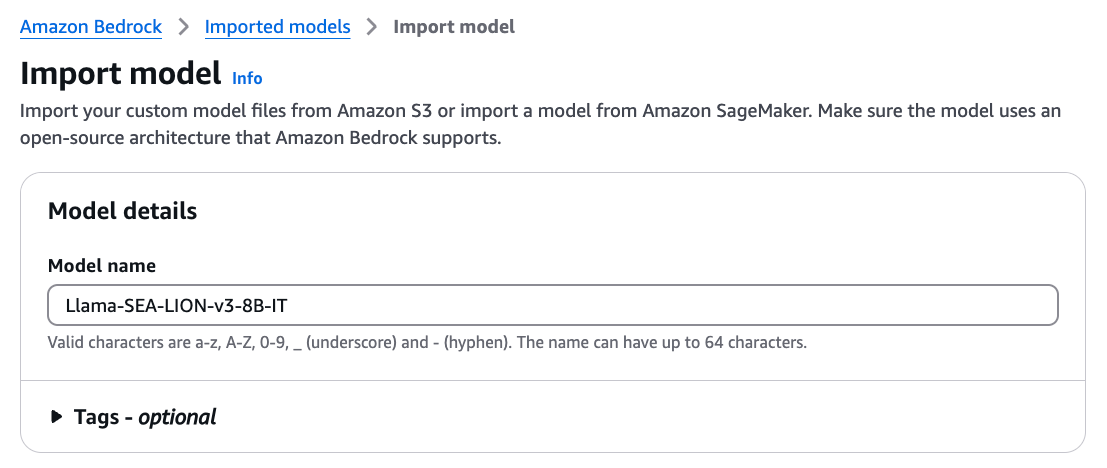
Input the model name and the S3 location of the uploaded model. Update the other [settings](https://docs.aws.amazon.com/bedrock/latest/userguide/model-customization-import-model-job.html) accordingly. Click **Import Model** to start the import.
After the import is completed, locate the model in **Imported models**.
Click the copy button to copy the **ARN** (Amazon Resource Name).
## Demo
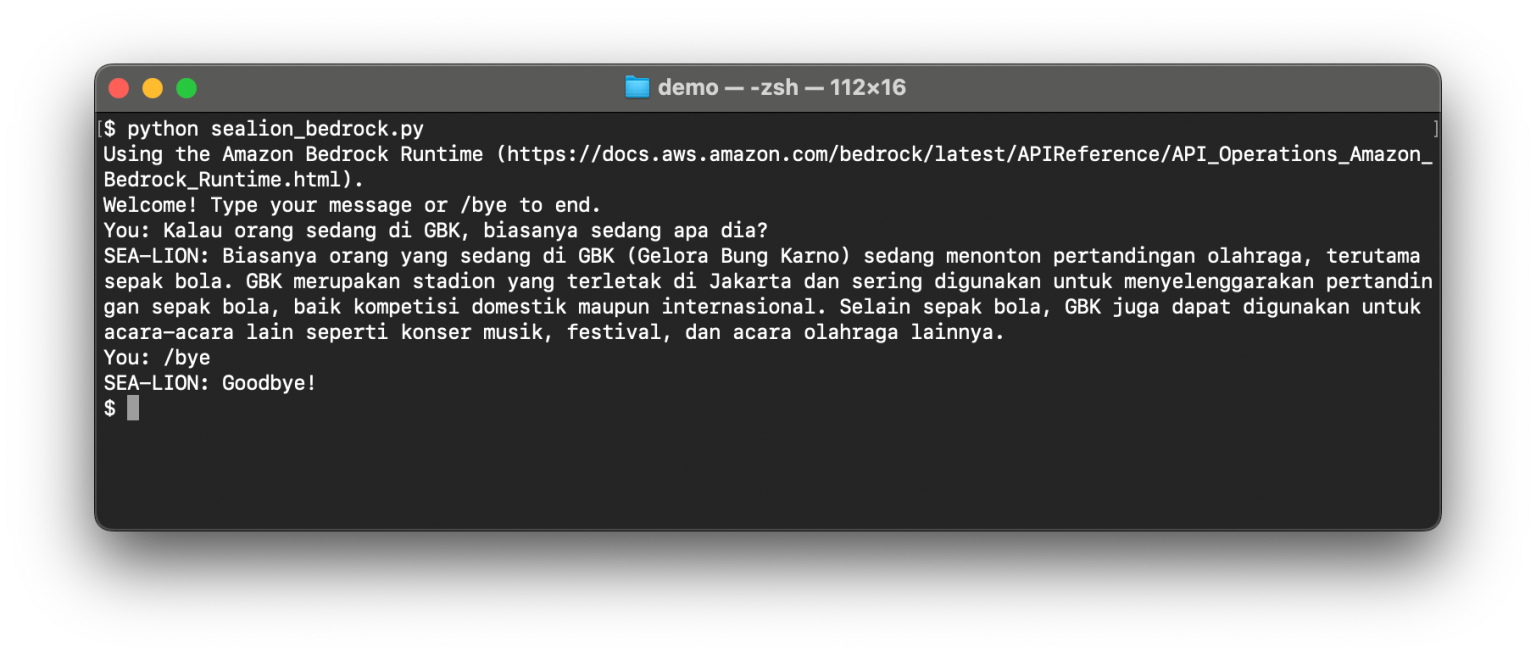
The demo application uses the [Amazon Bedrock Runtime](https://docs.aws.amazon.com/bedrock/latest/APIReference/API_Operations_Amazon_Bedrock_Runtime.html) to integrate with the imported model.
Clone the [repository](https://github.com/aisingapore/bedrock-access-gateway). The repository is a fork to include a functional demo and to support the imported models via the gateway.
```bash
git clone https://github.com/aisingapore/bedrock-access-gateway.git
```
Navigate to the demo directory.
```bash
cd bedrock-access-gateway/demo
```
Copy the environment file.
```bash
cp .env.example .env
```
Edit the value of `ENDPOINT_ARN` in the environment file and paste the **ARN** of the imported model.
Edit the value of `AWS_REGION` (e.g. us-east-1) in the environment file to match the region where the model was imported.
Before running the demo, it is a good practice to create a virtual environment to isolate the app. Please follow these steps to create a virtual environment, or feel free to use your preferred tool.
Initialise the virtual environment.
```bash
python -m venv venv
```
Activate the virtual environment.
```bash
source venv/bin/activate
```
Install the packages.
```bash
pip install -r requirements.txt
```
Set up the Boto3 credentials:
Run the demo.
```bash
python sealion_bedrock.py
```
## Exception Handling
Amazon Bedrock Custom Model Import optimizes the hardware utilization by removing the models that are not active. The demo might throw an exception that indicates the model is not ready for inference. Please refer to and customize your applications to handle it gracefully.
## Further Work
The demo uses the [AWS SDK](https://docs.aws.amazon.com/bedrock/latest/userguide/sdk-general-information-section.html) to integrate with the imported model. If you are looking for how to work with OpenAI-compatible APIs, given their popularity, please refer to the next [guide](/guides/inferencing/bedrock_access_gateway.md).
## Links
* SEA-LION models on Hugging Face:
* Import a customized model into Amazon Bedrock:
---
# Agent Instructions
This documentation is published with GitBook. GitBook is the documentation platform designed so that both humans and AI agents can read, navigate, and reason over technical content effectively. Learn more at gitbook.com.
## Querying This Documentation
If you need additional information that is not directly available in this page, you can query the documentation dynamically by asking a question.
Perform an HTTP GET request on the current page URL with the `ask` query parameter, and the optional `goal` query parameter:
```
GET https://docs.sea-lion.ai/guides/inferencing/amazon_bedrock.md?ask=&goal=
```
`ask` is the immediate question: it should be specific, self-contained, and written in natural language.
`goal` is optional and describes the broader end goal you are ultimately trying to accomplish on behalf of the user. GitBook uses it to tailor the answer towards what is most useful for that goal.
The response will contain a direct answer to the question and relevant excerpts and sources from the documentation.
Use this mechanism when the answer is not explicitly present in the current page, you need clarification or additional context, or you want to retrieve related documentation sections.